How to Delete Your Account
Follow these simple steps to permanently delete your Siku Zangu account
Step 1: Open and Sign in to the Siku Zangu App
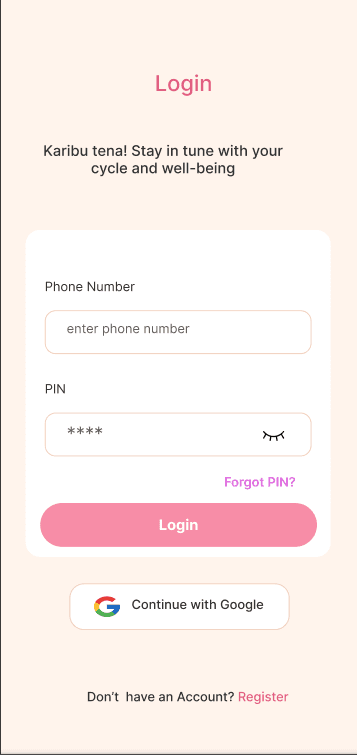
How to sign in to your account:
- 1.Open the Siku Zangu app from your device's home screen
- 2.If you're not a member, tap the "Create Member" text
- 3.Enter your Pin in the "Pin" field
- 4.Tap the Login button to access your account
- 5.If you forgot your PIN, tap the "Forgot PIN?" link below the PIN field
Step 2: Navigate to Your Profile Settings
How to access your profile settings:
- 1.After signing in, locate the "Profile" icon (the main app page shows your cycle)
- 2.Look for your profile icon in the bottom right of your page
- 3.Tap on your profile to access your personal information
- 4.Select the "Delete Account" option
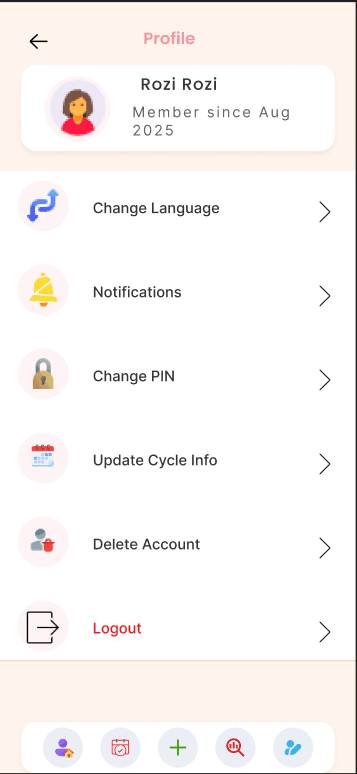
Step 3: Confirm Account Deletion
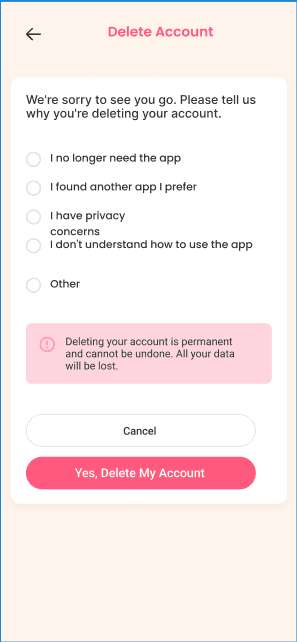
How to confirm account deletion:
- 1.A confirmation page will appear with options for why you're deleting your account
- 2.Read the warning carefully - this action cannot be undone
- 3.If you're sure, tap the "Yes, Delete My Account" button
- 4.To cancel, tap "Cancel" or close the dialog
Important Notice
Deleting your account will permanently remove all your data, including tracking information, logged symptoms, and cycle data. This action cannot be undone. If you're experiencing any issues with the app, please consider contacting our support team first at [email protected]